

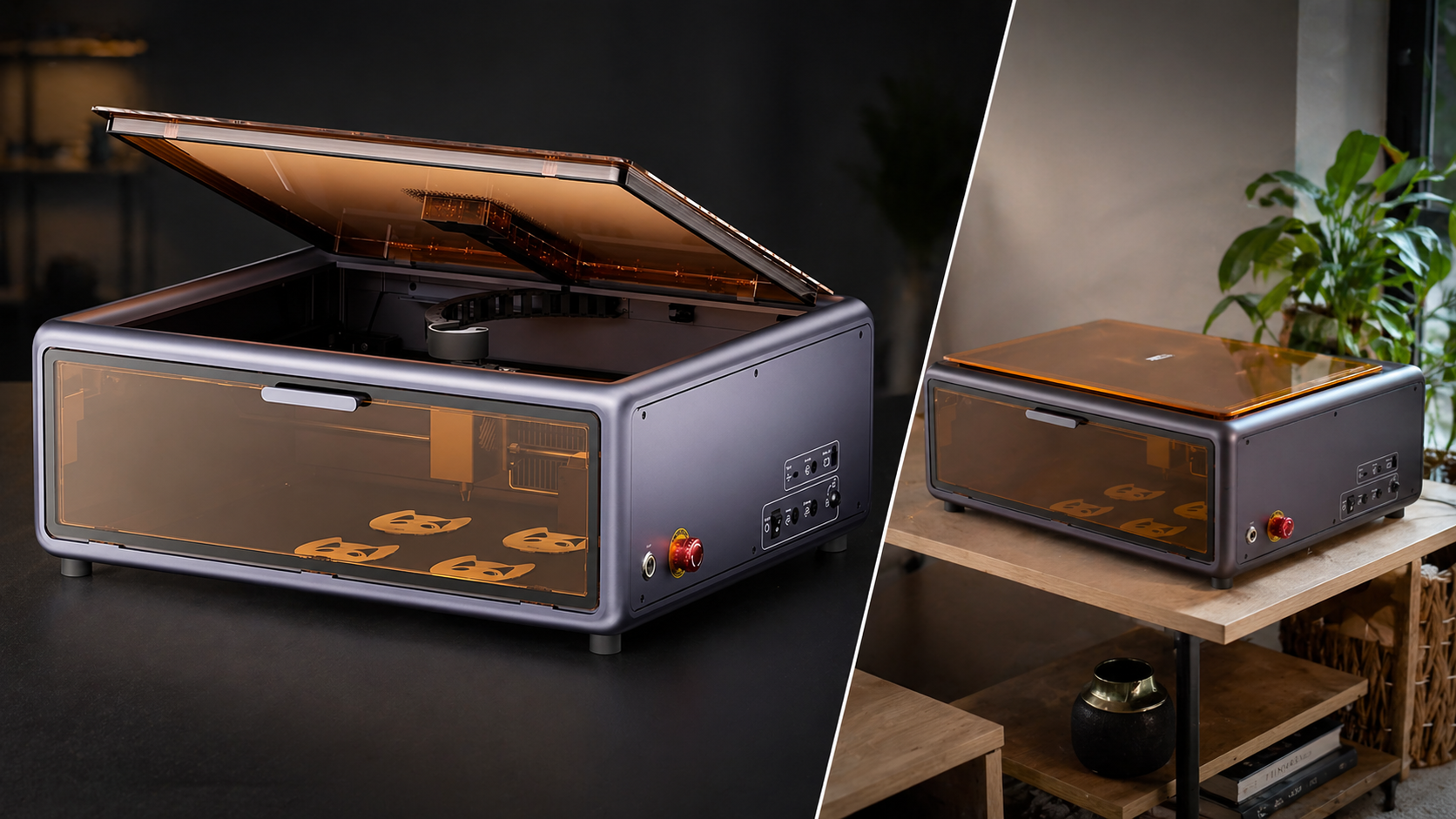
The Creality Falcon A1 10W Laser Engraver is one of those tools that immediately makes you think about possibilities. Whether you want to personalize products for your brand, create custom items for Etsy, or explore laser engraving as a serious hobby, this machine feels like a step above entry-level DIY gear.
After setting it up and running a few first projects, my impression is that the Falcon A1 is a very promising machine for someone in the prosumer space. It has a clean enclosed design, simple software, useful smart features, and enough capability to make it genuinely exciting for creators and small business-minded users.
That said, it is not perfect, and there are some limitations and setup frustrations worth knowing before you buy.
First Impressions
One of the biggest positives right away is the overall presentation of the machine. The Falcon A1 looks clean, modern, and relatively polished compared to a lot of other hobby-style machines. That matters more than some people think, especially if you are using it in a home office, studio, or even a living room.
In my case, the fact that it is enclosed and includes an exhaust system made it feel much more usable in a home environment. It looks good and feels more contained than many open-frame laser machines.
Setup was fairly straightforward. We downloaded the Falcon Design Space software, selected the machine, connected it with the provided USB cable, and followed the guided process. The software walks you through the basics, which helps reduce some of the intimidation factor for first-time users.
What I Liked
Easy setup and approachable software
The Falcon A1 does a good job of helping you get started quickly. The beginner mode in the software is a smart feature, especially for users who have never touched a laser engraver before. It lowers the barrier enough to let you get a first successful result without feeling overwhelmed.
Camera positioning is useful
The top-down camera makes placement easier and helps the machine feel more modern and user-friendly. Being able to see your material and line things up visually is a big plus, especially for custom branding or small projects.
Clean engraving results
Once dialed in, the machine produced crisp, clean-looking results. The initial Falcon logo test looked sharp, and the simple circle-and-logo project came out nicely as well. That gives confidence that the machine is capable of quality output for beginner and intermediate projects.
Good fit for custom products and small business ideas
This is where the Falcon A1 gets really interesting. If you have a small brand, sell handmade items, or want to personalize goods for events, gifts, or online sales, this machine has real potential. It feels like a tool that can support creative side hustles, Etsy projects, and custom product development.
What I Didn’t Like
Instructions are not very clear
One of the weaker points is the documentation. Some of the materials and directions are in Chinese, and the English that is included is not especially clear. That means the software ends up doing a lot of the heavy lifting when it comes to usability.
Calibration can take some patience
Even though the setup is relatively easy overall, getting the machine calibrated and fully ready took a little more effort than expected. It was not impossible, but it was not effortless either.
The explore section in the software feels unfinished
There is an “Explore” section that looks like it should help you browse projects and ideas, but the experience feels limited. The categories and projects are not very searchable, and a lot of the discovery depends on clicking the few visible images rather than browsing a full, organized library.
Exhaust is helpful, but not perfect
The enclosed system and exhaust definitely help, but you should still expect some smell during use. It is better than an open machine, but it does not eliminate fumes completely. Good ventilation still matters.
Who This Is For
The Creality Falcon A1 is a strong fit for:
- DIYers ready to level up from basic consumer tools
- Etsy sellers and custom product makers
- creators with a personal brand
- people making event items, gifts, or personalized products
- home-based small business users with enough space and ventilation
It is especially appealing for someone who wants to produce custom branded items, test new product ideas, or add personalization to products they already sell.
Who Should Skip It
This machine is probably not the best fit for:
- people with very limited space
- users without decent ventilation
- buyers who want a totally frictionless beginner experience
- people with no comfort using software or troubleshooting setup issues
- advanced users who need more capacity, more material flexibility, or more scale
It is also not ideal if your main use case involves larger materials, non-flat objects, or more advanced production workflows.
Final Verdict
The Creality Falcon A1 10W Laser Engraver is a compelling machine for the right user. It combines a polished look, enclosed design, useful smart features, and beginner-friendly software in a way that makes laser engraving more accessible.
It is not flawless. The instructions could be better, the explore section needs improvement, and the exhaust is not perfect. But the machine itself feels capable, exciting, and genuinely useful once you get it going.
If you are a DIY creator, small brand owner, Etsy seller, or prosumer user looking for a laser engraver that is approachable but still serious enough to support real projects, this is a strong option to consider.
For someone who wants to personalize products, experiment with branded items, or start building a small custom product business, the Falcon A1 offers a lot of value.
Affiliate Disclaimer
Some of the links in this post may be affiliate links, which means I may earn a commission if you make a purchase through them, at no extra cost to you.
Product Link:
https://amzn.to/4tCDLBZ



A WordPress Commenter
Hi, this is a comment.
To get started with moderating, editing, and deleting comments, please visit the Comments screen in the dashboard.
Commenter avatars come from Gravatar.